How We Automated Client Follow-Ups on Unicorn Factory
Discover how Unicorn Factory uses Make.com to automate client follow-ups, ensuring consistent engagement and saving time. Learn how automation can transform your business.

The Importance of Follow-Ups (And Why They’re So Time-Consuming)
Here’s the thing about follow-ups: they’re not just important—they’re essential. Following up with clients is how you build relationships, close deals, and keep the momentum going. It’s that little nudge that turns a cold lead into a hot opportunity. But the reality? Doing it manually is a nightmare. Think about it. Every time you send a follow-up email, you’re investing precious minutes that could be spent elsewhere. And as your client list grows, so does the time you spend chasing them down. Miss a follow-up, and you’re risking more than just a delayed project—you’re risking the relationship altogether. That’s why we knew we had to make a change. At Unicorn Factory, we couldn’t afford to let our follow-ups fall through the cracks. We needed a system that would keep our clients engaged without eating up all our time. So, we turned to Make.com, and the results have been nothing short of transformative. Now, let me walk you through exactly how we built our automated follow-up system, step by step.
How We Built Our Automated Follow-Up System
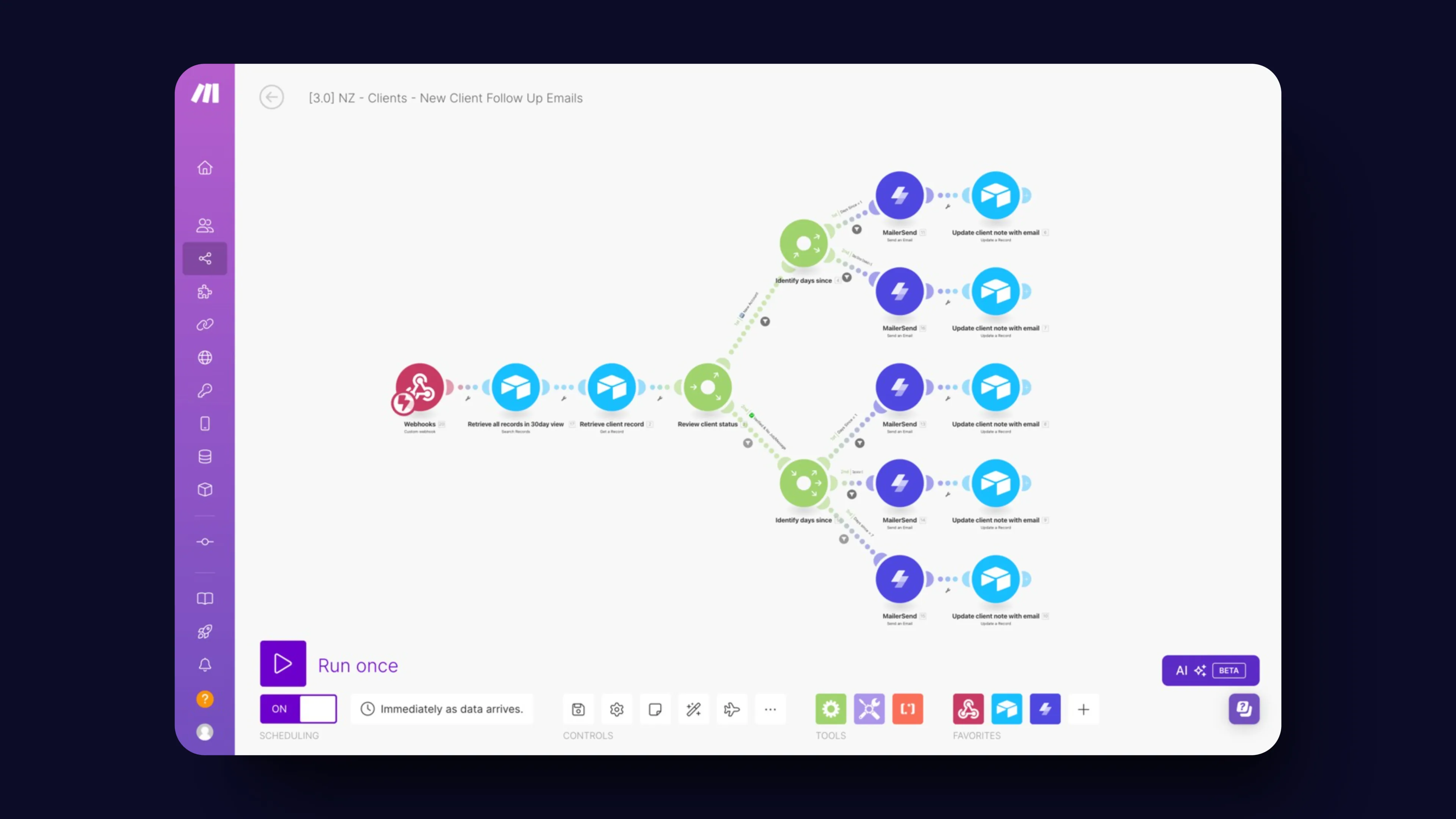
When we decided to automate our follow-ups, we had one goal: make the process as smooth and hands-off as possible, while still delivering a personal touch. Here’s how we did it, step by step.
Webhook Trigger
It all starts with a webhook. The moment a new client signs up on Unicorn Factory, a webhook fires off the automation. This is the "go" signal that kicks everything into gear. No more waiting around, no more manual data entry—just instant action as soon as someone joins our platform. If you want to dive deeper into how this works, check out my post on how to instantly trigger Airtable workflows in Make.com using webhooks.
Pulling Client Data
Next, we needed a way to pull in all the relevant client information, like their name, email, and company details. We store all this in Airtable, which acts as our central hub. Make.com pulls this data directly from Airtable, ensuring everything is up-to-date and ready to go.
Checking Client Status
But here’s where things get really interesting. Not all clients are in the same place in their journey, so we built in a status check. Is this a brand-new client who needs onboarding? Or is it someone we haven’t heard from in a while? Depending on their status, we tailor the follow-up sequence to fit their needs.
Sending Personalized Emails
With the client’s status in hand, Make.com then sends out personalized emails. Day 1 after signup? They get a warm welcome and a nudge to complete their profile. Haven’t heard from them in a week? Time for a friendly reminder. Each email is designed to feel like a one-on-one conversation, even though it’s completely automated.
Updating Client Records
Finally, every time an email goes out, we automatically update the client’s record in Airtable. We add a note detailing what was sent and when, so we always know exactly where each client stands. No more guessing games, no more missed opportunities. By automating these steps, we’ve created a follow-up system that’s efficient, effective, and totally scalable. And the best part? It runs on autopilot, freeing up our time to focus on growing the business. If you’re interested in more no-code tools that can transform your marketplace, check out my post on The Best No-Code Tools For Marketplaces in 2024.
Why This System Works for Us
At Unicorn Factory, we’ve always believed in working smarter, not harder. This automated follow-up system is the perfect example of that philosophy in action. Here’s why it’s been a game changer for us—and why it could be for you too.
Saves Time
First and foremost, automation saves us an incredible amount of time. What used to take hours of manual work—sending emails, updating records, following up—is now done automatically. This frees us up to focus on higher-impact activities, like refining our services and growing our client base.
Keeps Us Consistent
Manual processes are prone to errors and inconsistencies. Maybe you forget to send a follow-up, or maybe it goes out late. With automation, those worries are a thing of the past. Our system ensures that every client gets the right message at the right time, without fail. This consistency has not only improved our client relationships but also boosted our overall reliability as a service provider.
Stays Organized
One of the biggest concerns with automation is losing that personal touch. But with Make.com, we’ve found a way to maintain personalization while scaling our operations. Each email is tailored to the client’s status and needs, making it feel like a one-on-one conversation. The result? Higher engagement rates and happier clients.
Boosts Engagement
Finally, this system has significantly improved our client engagement. By sending timely, relevant follow-ups, we keep clients active and involved in the process. They’re more likely to complete their profiles, engage with our platform, and ultimately, stick around longer. And that’s good for both them and us. Automation isn’t just a nice-to-have—it’s a must-have if you want to scale your business without losing that personal touch. Now that you’ve seen why this system works so well for us, let’s recap the key takeaways so you can start building your own automated follow-up system.
Ready to learn more? Check out our Playbooks for step-by-step guidance.
View PlaybooksContinue Reading