How to Build a Directory Outreach System That Gets Replies
Build a personalized outreach system for your directory using Airtable, Make.com, and Tella to turn listings into real business relationships.



Why Outreach Matters for Your Directory’s Growth
You’ve done the hard part. You picked your niche, designed your landing page, and started adding listings. Maybe you’ve even set up filtering and SEO-friendly URLs. But here’s the reality: just publishing a directory doesn't make it useful — or valuable — to anyone. This is where many builders hit a wall. The question becomes: “How do I actually grow this thing?” Most people assume that traffic will come naturally or that businesses will stumble upon their listing. But in practice, this rarely happens — especially when you’re just getting started. Businesses won’t know about your directory unless you tell them.
The Outreach Mindset
Outreach isn’t about pitching. It’s about building relationships. It’s your first opportunity to show the people you’ve listed that your directory is real, thoughtful, and created with intention. Instead of just saying “Hey, your business is on my site,” you’re saying: “I built something to help promote you. Here’s a preview — let me know what you think.” That subtle shift in tone — from transactional to collaborative — is what turns a cold email into the start of a meaningful business relationship.
Why Cold Outreach Is the Perfect First Step
At this early stage, you don’t need hundreds of replies. You need a few great ones. Here’s why cold outreach works so well for directory builders:
- It’s scalable, but personal – You can create dynamic templates that still feel human.
- It drives feedback – Real businesses will tell you what works, what’s missing, and whether they’d actually use your site.
- It opens the door for monetization – Whether it's affiliate partnerships, paid listings, or featured placements, these conversations start with a single email.
- It builds credibility – The more responses and relationships you build, the more “social proof” your directory collects.
What Most People Get Wrong
Here’s the mistake 90% of new builders make: They send a generic email like, “Hey, I listed your business on my site. Want to upgrade to premium?” This kind of outreach feels mass-produced and transactional. It doesn’t show effort. It doesn’t build trust. And it usually ends up in the trash folder. In contrast, what we’re going to do is design an outreach system that says: “I found your business, added it to my site, and created something that might genuinely help you. Here’s what it looks like.” That’s the shift. That’s what makes outreach work.
What Makes a Cold Outreach Email Actually Effective
Let’s face it — cold outreach has a bad reputation. We’ve all received those generic LinkedIn DMs or boring email pitches that scream “copy and paste.” You can spot them a mile away, and your gut reaction is always the same: Delete. Unsubscribe. Block. That’s exactly what we want to avoid.
The First Impression Is the Email
When you’re running a directory, your outreach email is often the first time a business hears from you. It’s not your homepage. It’s not your branding. It’s your email — and if it feels lazy, everything you’ve built loses credibility. But when the email feels thoughtful and intentional, you create a moment of surprise that makes people curious.
The 3 Ingredients of a Great Cold Email
Here’s the simple framework I use in every outreach message:
1. 🧠 Build Trust Fast
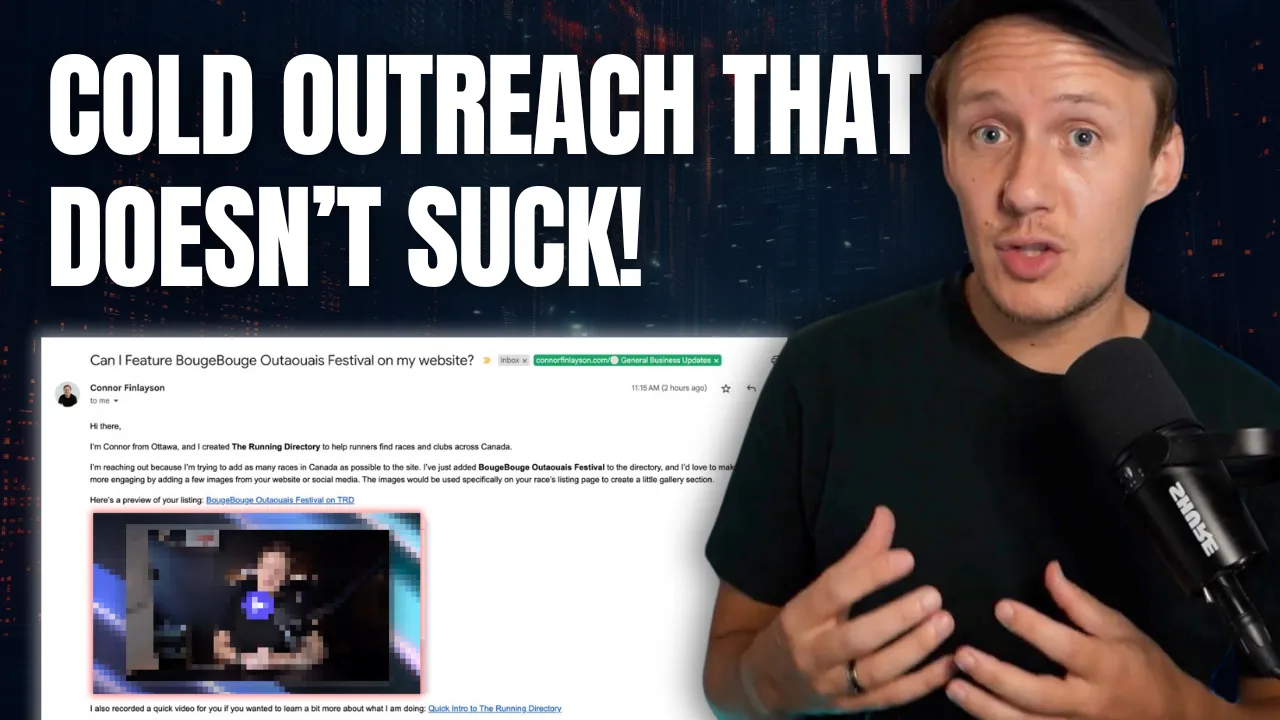
Introduce yourself clearly. Say where you're from and why you're reaching out. If your directory is local, mention your city or region — it instantly creates relevance. “Hey, I’m Connor from Ottawa. I just added your race to The Running Directory, a site I created to help people find events like yours.”
2. 🛠️ Show Effort
This is the kicker. You’ve already created a listing for them. Lead with that. Include a link to their page and tell them you’d like to make it even better by adding a few of their images. “Here’s a preview of the page I created for your event. Would it be okay to use a few photos from your site or Instagram to complete the listing?” Now you’re not just asking for something — you’re offering value first.
3. 🎯 Keep the Ask Light
Your goal isn’t to get them to sign up for a premium plan or book a call right away. It’s to start a conversation. So instead of, “Want to upgrade to premium?” Try, “Would it be okay if I featured a few of your photos on the page?” It’s a soft, friendly request — and much harder to ignore.
Personalize Your Directory Outreach with Video and Thumbnails
Let’s be real — inboxes are crowded. Even a well-written email can get lost. That’s why adding visuals and video makes such a huge difference. When you show someone a preview of what you’ve already built and speak to them directly in a short video, it signals something powerful: “I didn’t just list your business. I care about doing this right.”
🔗 Add the Listing Link
First, include a direct link to their page in your email. This instantly proves you’re not bluffing — you’ve actually featured them. Make the link easy to spot with anchor text like: → View your listing or → Check out your page on [Your Directory Name]
🖼️ Add a Custom Preview Thumbnail
Next, create a small preview image that shows what the listing looks like. Think of it like a little “screenshot + brand combo.” Here’s how I do it:
- Take a screenshot of the live listing page (I automate this with Urlbox).
- Use Placid to overlay their brand and my face in the corner (optional but adds a human touch).
- Insert that image into the email so it looks like a personalized video preview. This image is clickable and drives curiosity — which often leads to clicks and replies.
🎬 Record a Short Video in Tella
This is where the magic happens. Using Tella, record a simple 3-part video:
- Intro Clip (10–15 seconds)
- “Hey, I’m [Your Name], I run [Your Directory]. Just wanted to quickly show you what I’ve built for your business…”
- Walkthrough Clip (30–60 seconds)
- Show them their actual listing. Talk through what’s on the page, how people can find it, and any extra features.
- Call to Action Clip (10–15 seconds)
- Wrap up with a friendly ask:
- “Let me know if it’s okay to include a few photos — happy to update this page anytime!” Once recorded, Tella gives you a shareable link and even generates a GIF preview to embed directly in your email.
💡 Why This Works
- It puts a face and voice to the email
- It shows real effort
- It sets you apart from every other lazy “Hey, check out my site” email
- And it increases your reply rate — significantly In the next section, we’ll tie it all together by showing you how to automate this entire workflow using Airtable and Make — without losing that personal touch.
Automate Directory Outreach Emails with Airtable + Make
Creating personalized outreach emails manually is doable for 5 or 10 listings — but what happens when you have 50? Or 500? That’s where automation comes in. Using Airtable and Make.com, you can build a workflow that generates personalized outreach emails at scale — while still making every message feel like it was handcrafted.
🧱 Step 1: Set Up Your Airtable Base
Start by adding these fields to your Listings table in Airtable:
Business NameEvent Title(if applicable)Listing URL(link to their page on your site)EmailScreenshot URL(we’ll automate this)Thumbnail Image URL(also automated)Video Link(either a generic Tella video or a personalized one)Email Draft StatusSend Date(to track follow-ups) You can also add aCreate Draftbutton field to trigger the automation.
🖼️ Step 2: Generate a Custom Thumbnail
To make your outreach emails stand out visually, set up a Make.com scenario that:
- Takes the
Listing URL - Sends it to Urlbox to generate a screenshot
- Passes that screenshot to Placid to create a branded thumbnail
- Uploads the finished image to Airtable in the
Thumbnail Image URLfield
📬 Step 3: Auto-Generate Email Drafts
Use Make.com to create a second automation that:
- Pulls the contact’s name, listing link, thumbnail image, and Tella video link
- Inserts them into a pre-written email template
- Sends the full message to your Gmail drafts folder — not sent yet, just saved
- Updates Airtable to show that a draft was created This gives you a chance to manually review or tweak each message before it goes out.
🎥 Optional: Personalize the Video at Scale
If you want to go the extra mile:
- Use the generic Tella video by default
- But when you have time, duplicate the Tella project and re-record the middle clip for specific businesses
- Update the
Video Linkfield in Airtable to point to the custom video Now your email still uses the same automation — but feels 100% personal.
✉️ Email Preview Example (Fully Automated)
Here's what the final email might look like (automatically generated): Subject: We added [Event Title] to [Your Directory Name] Hey [First Name], I’m [Your Name] from [Your City], and I created [Your Directory] to help people discover events like yours. I just added [Event Title] to the site, and I’d love to make the page even better by adding a few photos from your website or Instagram. 👉 [View your listing]([Listing URL]) Here’s a quick video I recorded to show you what I’ve built:  Would it be okay if I included a few images? Let me know! Best, [Your Name] [Directory URL] In the next section, we’ll show you how to keep track of replies, follow up with people who don’t respond, and make sure no opportunity slips through the cracks.
Track Replies and Follow Up Like a Pro
You’ve done the hard work. You’ve built the directory, personalized the outreach, and sent the email. Now here’s the part most people skip: follow-up. If you don’t have a system for tracking who replied (and who didn’t), you’re going to miss out on opportunities — not because people aren’t interested, but because people forget.
🕒 Why Follow-Up Matters
Inbox overload is real. Even thoughtful, well-designed emails get buried. That’s why I treat follow-ups as a core part of the outreach system, not an afterthought. Here’s what I’ve found:
- Most positive replies come after the second or third message
- Following up 2–3 times is totally reasonable (as long as it’s friendly)
- The key is to space it out and make each follow-up feel casual, not pushy
🗂️ Use Airtable Views to Stay Organized
Here’s how I do it inside Airtable:
- Track Send Dates
- Add a
Send Datefield when you manually or automatically send your outreach email. - Create Follow-Up Views
- Use filters to surface listings that need a nudge. Example:
- View 1: “No Reply After 3 Days”
- → Filter:
Send Dateis more than 3 days ago ANDResponseis empty - View 2: “No Reply After 7 Days”
- → Use for a second gentle nudge
- Manually or Automatically Trigger Follow-Ups
- You can either:
- Manually write each follow-up email (recommended for now)
- Or use Make.com to automate sending pre-written nudges via Gmail or your ESP
✍️ Example Follow-Up Email (Friendly & Light)
Subject: Just wanted to follow up 🙂 Hey [First Name], I sent a note last week about the listing I created for your [event/business] on [Your Directory]. Totally understand things get busy — just wanted to follow up and see if it’s okay to use a few of your photos to make the page even better. Here’s the link again if you want to check it out: [Listing URL] No pressure either way — just let me know! Cheers, [Your Name]
📊 Bonus: Set Up Follow-Up Triggers
As your system grows, you can:
- Use Airtable automations or Make to tag records when a follow-up is needed
- Create Slack or email reminders for yourself
- Add a
Responsefield to log whether someone replied (and how) The goal is simple: no lead gets left behind — and no email gets lost in the void.
Final Tips to Scale Your Outreach System Right
You now have everything you need to start building real connections with the businesses you list — but before you launch your first batch of emails, here are a few best practices to keep your system running smoothly:
1. 🧪 Test with 3–5 Listings First
Before scaling up, start small. Send a few emails manually, watch how people respond, and make small tweaks to your message, subject line, or thumbnail format.
2. 🧠 Don’t Over-Automate (Yet)
It’s tempting to automate the whole system end-to-end from day one. But when you’re still validating your approach, keep the final send manual. That way you can personalize things or fix edge cases before they become mistakes at scale.
3. 🎯 Prioritize High-Impact Listings
If you’ve added 100+ listings to your directory, not all are created equal. Start your outreach with:
- Businesses that are well-known in their space
- Listings that would look great as case studies or testimonials
- People you genuinely want to work with This helps you build early momentum and social proof.
4. ✨ Don’t Stress About Perfection
Your first video might feel awkward. Your thumbnail might look a little off. That’s okay. What matters most is effort. People can feel when something is made for them — even if it’s not flawless.
5. 🔁 Systematize, Then Optimize
Once you’ve nailed your core workflow, build in time every month to:
- Review what’s working (open/reply rates)
- Refresh your video or copy if needed
- Add automations that save you time but don’t kill the personal touch
Ready to learn more? Check out our Playbooks for step-by-step guidance.
View PlaybooksContinue Reading